How to Take Great Product Photos With Your Phone (2026 Guide)
Professional product photos don't require a studio or an expensive camera. This guide shows you exactly how to take photos that sell - using only your phone.
How to Take Great Product Photos With Your Phone (No Studio Required)
Bad product photos lose sales before the buyer reads a single word of your description. Great photos build trust instantly, answer visual questions, and make buyers confident enough to order.
The good news: you don't need a DSLR, a studio, or a photographer. Modern smartphones are capable of genuinely compelling product photos. If you know how to use them. This guide covers everything from setup to editing, using only what you already have.
Quick Navigation
What You Actually Need
Keep it minimal. Buy nothing expensive before you've tested what you have.
Your smartphone: any phone released in the last 3 years has a camera good enough for professional-looking product photos when used correctly
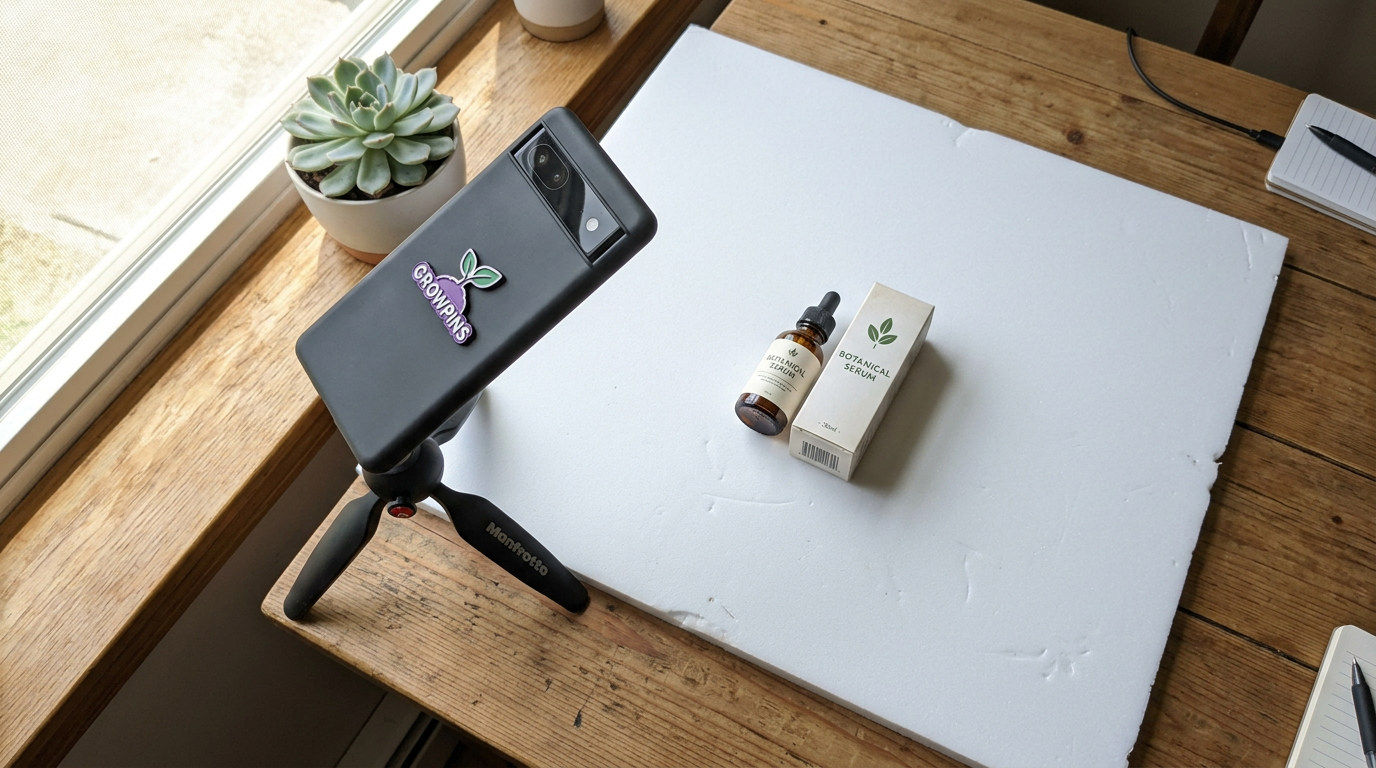
White foam board or cardboard: a few dollars / equivalent in your local currency at any stationery shop; used as a clean backdrop and as a reflector to bounce light
A window with natural light: the best light source available to you; zero cost
Mini tripod or phone stand: prevents blurry shots; under $10 / £8 equivalent from electronics retailers
A flat surface: your dining table, a clean floor, a desk
Optional extras: a second foam board as a reflector, a few small props relevant to your product (a flower, a fabric swatch, a ribbon), and a lightbox for very small items.
Lighting: The Only Thing That Truly Matters
A cheap phone in great natural light beats an expensive camera in bad light every single time. Lighting is the skill. Everything else is secondary.
Natural window light (always recommended first)
Position your product 30 between 90 cm from a large window. The window should be to the side and not behind the product (which causes silhouettes) and not directly in front (which creates flat, shadowless images). Overcast daylight is actually ideal. The clouds act as a natural diffuser, giving you soft, even light with no harsh shadows.
Best time to shoot: mid-morning to early afternoon. Avoid direct sunlight as it creates harsh shadows and blown-out highlights that editing can't fully fix.
Reflector trick (professional result, zero cost)
Place a white foam board opposite your window. It will bounce light back onto the dark side of your product, filling in shadows and creating an even, studio-quality result. This is exactly what professional photographers do nothing more. The foam board does what a $200 studio reflector would do.
When natural light isn't available
Standard household bulbs cast a yellow or orange tint on every product. If you must shoot without window light, use a daylight-balanced LED ring light or softbox. Both are affordable options in most markets.
Choosing the Right Background
Your background frames the product and communicates your brand. Choose it deliberately.
White or neutral background
White or light grey keeps all attention on the product. It's the industry standard for main product images and is required by marketplaces like Amazon. To achieve this, use a white foam board, a sheet of white paper, or a white wall.
Contextual or lifestyle background
Showcase your product in use or in its natural environment to appeal to the buyer. A candle on a wooden coffee table beside a book. A bag on a person's shoulder. A snack on a kitchen counter. These shots convert well on social media and help buyers visualise the product in their lives.
Textured backgrounds
Think about adding elements like linen, wood boards, marble paper, or rattan surfaces to your setups. They do wonders for visual interest and really showcase a brand's personality.
Rule: The background complements the product; it doesn't compete with it. Products with lots of colour and detail need plain backgrounds. Simple products can handle more visual interest behind them.
Composition and Angles
How you frame your shot communicates as much as the product itself.
Flat lay (overhead)
Camera directly above the product, shooting straight down. Works brilliantly for fashion, accessories, food, and beauty. Gives you full creative control of what's in frame.
Eye level (straight on)
Camera at the same height as the product. Works well for bottles, bags, shoes, and anything with a front face. Clean and direct.
45-degree angle
Camera angled down at roughly 45 degrees. Shows depth and dimension. The most forgiving angle for beginners, and it works for almost every product type.
Rule of thirds
Enable the grid on your phone camera. Place your product at the intersection of the grid lines rather than dead centre. The result looks deliberate and professional, not accidental.
Close-up detail shots
Include macro shots of texture, stitching, labels, and materials. A close-up of handmade beading or a clasp answers "Is it quality?" before the buyer can ask. Detail shots are trust-builders.
Phone Camera Settings That Make a Difference
Tap to focus: tap the screen on your product to ensure the camera focuses on it, not the background.
Lock exposure: on most phones, hold your finger on the focus point to lock both focus and exposure. This prevents the camera from auto-adjusting mid-shoot
Use rear camera only: always use the back camera; rear sensors are significantly better than front-facing one.s
Highest resolution availabe : don't use compressed or reduced-quality modes
Turn off the flash: built-in flash creates harsh, flat lighting and unflattering colour casts; use natural or supplementary light instea.d
Portrait mode carefully: portrait mode creates background blur that looks great for some products but can be unpredictable with small items. You can test it.
RAW if available: RAW files retain more detail for editing; available on many modern Android phones and iPhones
Editing Your Photos (Free Apps, 15 Minutes)
Every professional product photo goes through editing. That doesn't mean heavy manipulation, which means basic adjustments that let the photo show the product at its best.
Free apps worth installing
Snapseed (free): excellent for brightness, contrast, saturation, and healing dust spots; also fixes perspective if your shot is slightly angle.d
Lightroom Mobile (free version): the same tool professional photographers use; great for applying consistent edits across a product range
VSCO (free): popular for consistent, aesthetic presets that give your photos a cohesive visual identity
Remove.bg: automatically removes the background and replaces it with white; useful for marketplace listings.
The five edits to apply to every photo
Brightness: lift if the photo looks dark; reduce if overexposed
White balance: correct any yellow or blue tint; your whites should look white
Contrast: a small boost adds depth and definition
Sharpening: a small amount makes textures and details pop
Crop and straighten: ensure horizontal and vertical lines are straight; frame the product cleanly
Consistency tip: create a preset in Lightroom or save your edit settings in Snapseed after editing your first photo. Apply the same settings to every photo in that session. This creates a professional, cohesive look across your entire store.
The 6 Types of Product Photos Every Listing Needs
Main hero shot: clean background, product centred, best angle; this is your primary listing image.
Multiple angle shots: front, back, side, and top where relevant
Detail close-up: material texture, label, stitching, unique feature
Scale reference: product held in hand, or next to a familiar object, so buyers understand actual size
Lifestyle shot: product in use or in context; your best social media image
Packaging shot: shows how the order arrives; good packaging is a selling point and reduces "what did I receive?" messages
For most products, 5 to 6 photos covering these categoriesares enough. Each photo should answer a different question or show a different aspect. Not to repeat the same angle at a slightly different distance.
Frequently Asked Questions
What's the best phone camera for product photography?
Any flagship or mid-range phone from the last 2–3 years is capable: iPhone 13 or newer, Samsung Galaxy S21 or newer, Google Pixel 6 or newer. The phone matters far less than lighting and setup. A mid-range phone in great natural light beats a flagship in bad light every time.
Should I use a white background for all my product photos?
Use white for your main listing image, especially on marketplaces. For your store, social media, and additional photos, lifestyle and textured backgrounds often perform better. Most successful sellers use both: white for the primary shot, styled for the social media shot.
How many photos should each product listing have?
A minimum of 3 to 4 is ideal. You go for 5 to 8. The main hero shot, at least one detail shot, a scale reference, and a lifestyle or context shot. Listings with more photos consistently outperform listings with fewer in both click-through rate and conversion rate.
Can I use AI to improve my product photos?
AI background removal and basic enhancement tools are well-established and free. Remove.bg and Canva's background remover work reliably. AI image upscaling is available in apps like Remini. Growpins' AI tools can help with product descriptions to complement your photos.
Share this post
Have a question about this post? Contact the author