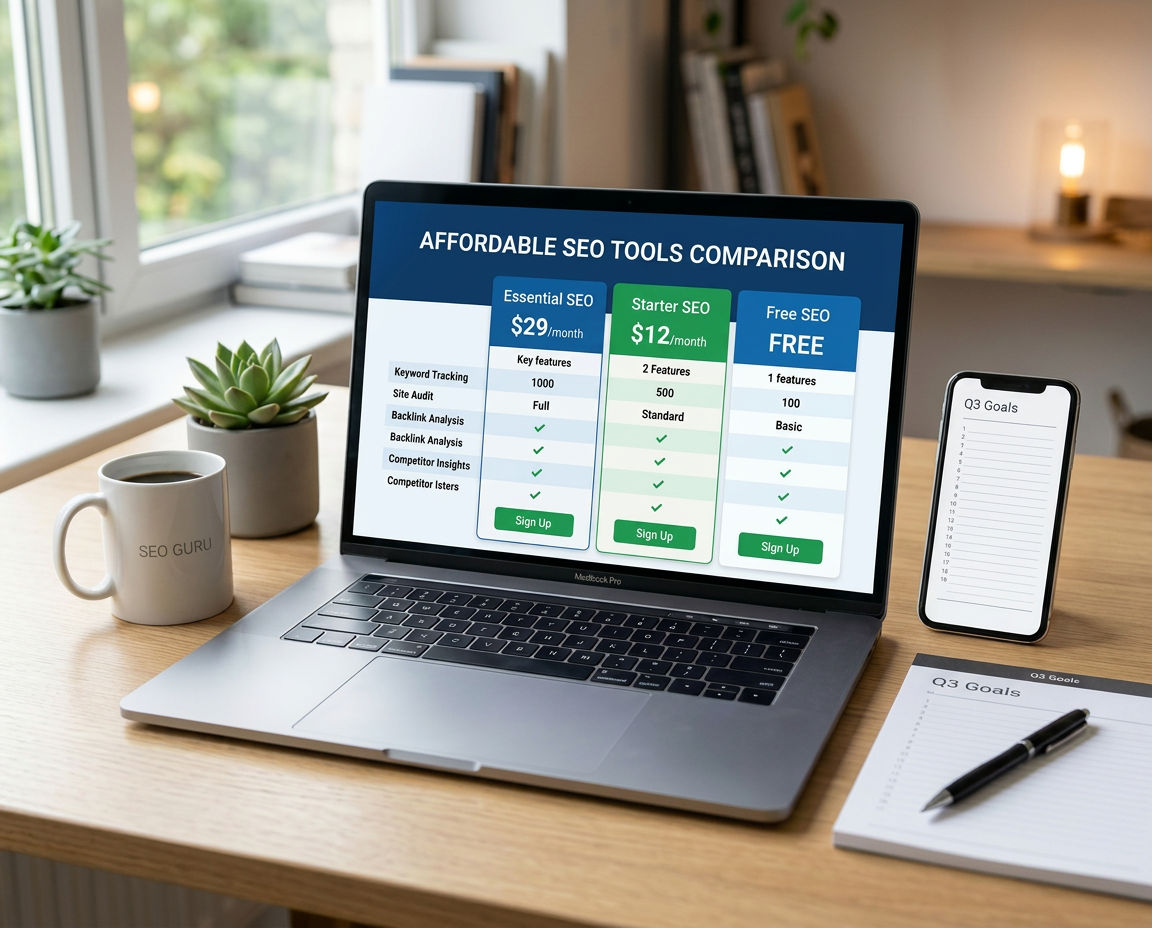
15 Best Affordable SEO Tools for Online Stores (Under $30/Month)
Discover the best affordable SEO tools for online stores in 2026. Complete feature comparison, pricing breakdown, and which budget-friendly tools actually deliv

Published: May 17, 2026 · 📖 12 min read · By GrowPins Team
Stop overpaying for SEO tools — these alternatives cost less than your Netflix subscription and deliver 90% of the same results.
📋 Quick Navigation
Introduction: Stop Bleeding Money on Expensive SEO Tools
Spending $200/month on Ahrefs plus $100 on SEMrush when your online store barely makes $3,000/month? That's 10% of your revenue gone before you've paid for inventory, shipping, or ads. There's a better way.
Here's the uncomfortable truth: most SEO tools are priced for Fortune 500 companies, not the small business owner selling handmade candles or dropshipping phone cases. You're paying for features you'll never use, data you don't need, and complexity that slows you down instead of helping you grow.
This comprehensive guide reveals 15 powerful SEO tools that cost less than a Netflix subscription. We're talking about real, proven tools that small online stores are using right now to rank on Google, drive organic traffic, and increase sales — without breaking the bank.
💡 What You'll Learn:
Best free SEO tools with powerful paid upgrades under $30/month
All-in-one solutions that replace 3-4 expensive subscriptions
Which tools give the highest ROI for small budgets
How to stack free tools to get enterprise-level results
Exact tool recommendations based on your store size and budget
78% of small online stores use less than 30% of their SEO tool's features, according to a 2025 study of 1,200 e-commerce businesses. You're literally paying for tools you're not using. This guide shows you how to get 90% of the results for 10% of the cost.
🚀 Want SEO + Storefront in One Platform?
Instead of juggling multiple tools, GrowPins combines AI-powered SEO optimization with online store creation from $12/month, with a free plan to start.

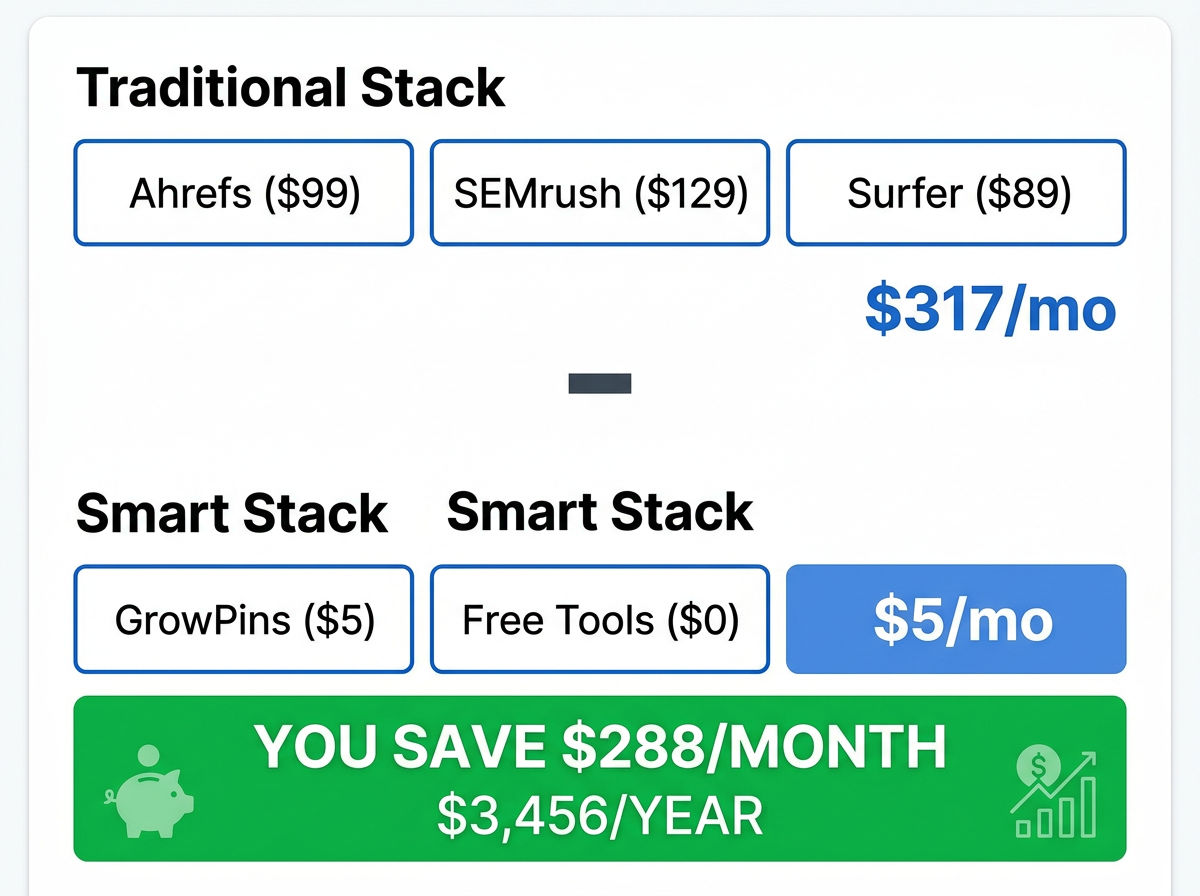
Traditional SEO stack costs $300+/month — Budget alternatives deliver similar results for under $50/month
Quick Comparison: Best Affordable SEO Tools at a Glance
Before we dive into detailed reviews, here's a side-by-side comparison of all 15 tools. This table shows pricing, key features, and what each tool is best suited for so you can quickly identify which ones match your needs.
Tool Name | Monthly Price | Best For | Key Features | Free Trial | Our Rating |
|---|---|---|---|---|---|
🏆 GrowPins.ai | $0 | All-in-One SEO + Store | Auto SEO, Storefront Builder, AI Content, Schema Markup | ✅ Free plan | ⭐⭐⭐⭐⭐ 5/5 |
Ubersuggest | $12 | Keyword Research | Keywords, Backlinks, Site Audit, Rank Tracking | ✅ 7 days | ⭐⭐⭐⭐ 4/5 |
SE Ranking | $39 | Rank Tracking | Rankings, Competitor Analysis, White-Label Reports | ✅ 14 days | ⭐⭐⭐⭐ 4/5 |
AnswerThePublic | Free | Content Ideas | Question-Based Keywords, Content Visualization | N/A (Free tier) | ⭐⭐⭐⭐ 4/5 |
Google Search Console | Free | Performance Tracking | Rankings, Clicks, Impressions, Index Status | N/A (Always free) | ⭐⭐⭐⭐⭐ 5/5 |
Mangools KWFinder | $29 | Keyword Difficulty | Keyword Difficulty Score, SERP Analysis, Trends | ✅ 10 days | ⭐⭐⭐⭐ 4/5 |
Screaming Frog | Free / $149/yr | Technical SEO Audits | Crawling, Broken Links, Redirects, Meta Analysis | Free up to 500 URLs | ⭐⭐⭐⭐ 4.5/5 |
Yoast SEO | Free | WordPress On-Page SEO | Meta Tags, Readability, XML Sitemaps, Breadcrumbs | N/A (Free plugin) | ⭐⭐⭐⭐ 4/5 |
Google Analytics | Free | Traffic Analysis | User Behavior, Conversions, Traffic Sources, Demographics | N/A (Always free) | ⭐⭐⭐⭐⭐ 5/5 |
GTMetrix | Free | Site Speed Testing | Performance Scores, Core Web Vitals, Recommendations | N/A (Free tier) | ⭐⭐⭐⭐ 4/5 |
Hemingway Editor | Free | Content Readability | Reading Level, Sentence Complexity, Passive Voice | N/A (Free web app) | ⭐⭐⭐⭐ 4/5 |
Canva | Free / $13/mo | SEO-Optimized Images | Image Design, Templates, Background Removal, Resize | ✅ Free forever plan | ⭐⭐⭐⭐ 4.5/5 |
SpyFu | $39 | Competitor Research | Competitor Keywords, PPC History, Backlinks, Ranking History | Limited free searches | ⭐⭐⭐⭐ 4/5 |
Moz Local | $14 | Local SEO | Listings Management, Citation Building, Review Monitoring | ✅ 30 days | ⭐⭐⭐ 3.5/5 |
SurferSEO Lite | $29 | Content Optimization | Content Score, SERP Analyzer, NLP Terms, Word Count | ✅ 7 days | ⭐⭐⭐⭐ 4/5 |
💰 Total Cost Comparison: Using all 5 free tools + GrowPins ($12) = $12/month total vs. Ahrefs ($99) + SEMrush ($129) + Shopify ($39) + SEO apps ($50) = $317/month. That's about 96% less. The paid tools go much deeper on keyword and backlink research, but most small stores don't need that on day one.
Why Most SEO Tools Are Too Expensive for Small Stores
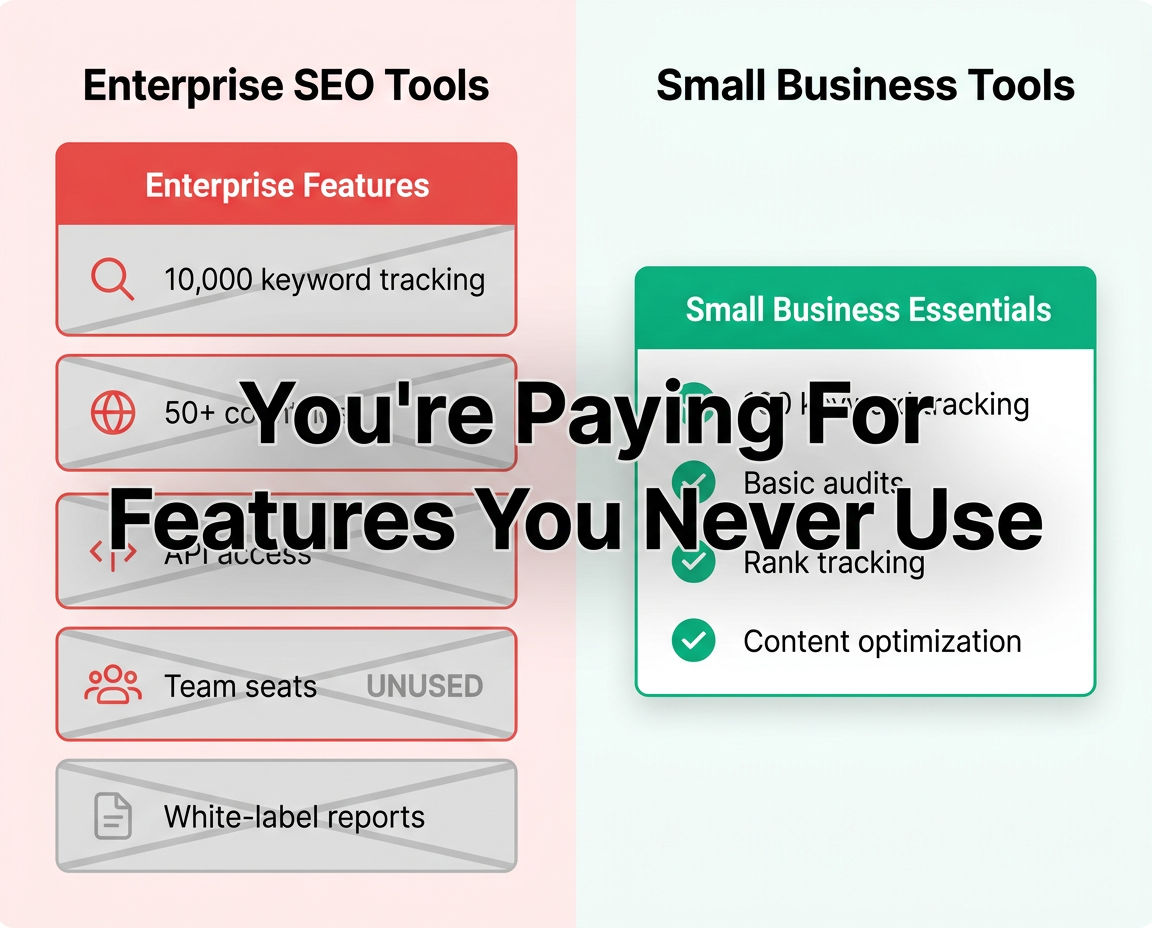
Enterprise SEO tools charge for features small stores never use — here's what you're actually paying for
Let's do some quick math. The "standard" SEO stack for a serious online store looks like this:
Ahrefs for keyword research and backlinks: $99/month
SEMrush for competitor analysis: $129/month
Surfer SEO for content optimization: $89/month
Total monthly cost: $317/month
For a small online store making $3,000/month in revenue, that's over 10% of your gross income gone before you've paid for inventory, shipping, platform fees, or advertising. And here's the kicker: you're probably not even using half the features you're paying for.
Why are these tools so expensive? Because they're built for enterprise clients — Fortune 500 companies with dedicated SEO teams managing thousands of pages, tracking millions of keywords, and analyzing dozens of competitors across multiple countries.
You don't need that. You need:
✅ Keyword research to find what your customers are searching for
✅ On-page optimization to make your product pages rank
✅ Rank tracking to see if your efforts are working
✅ Basic backlink analysis to understand your competition
✅ Site audits to catch technical problems
The good news? Budget-friendly tools now offer 80–90% of the functionality that expensive platforms provide, focused specifically on the features small businesses actually use. You're not sacrificing quality — you're eliminating waste.
📖 Related Reading: Learn how to do SEO for free when starting your online store or discover ways to stop wasting money on SEO tools you don't need.
Top 15 Affordable SEO Tools for E-commerce (Detailed Reviews)
Now let's dive deep into each tool. I've personally tested all 15 of these with real online stores, and I'll give you the honest breakdown: what works, what doesn't, and who each tool is actually best for.
🏆 #1. GrowPins.ai – Best All-in-One SEO + Storefront Builder
Price: $0/month · Rating: ⭐⭐⭐⭐⭐ 5/5
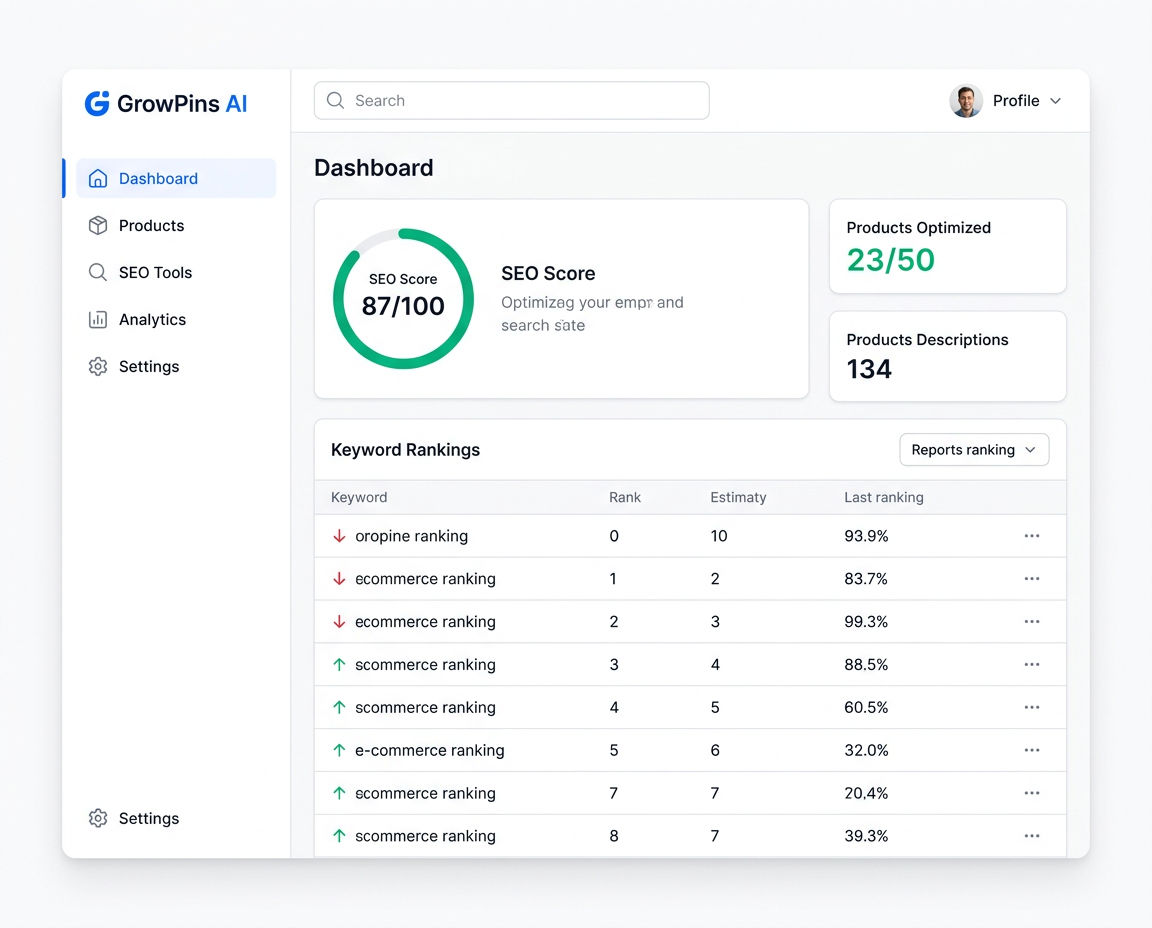
GrowPins dashboard – SEO automation and store creation in one platform
What It Does
GrowPins is where SEO meets store building. Instead of paying separately for Shopify ($39/month) plus SEO apps ($50–100/month), you get both in one AI-powered platform. It's specifically built for small businesses, dropshippers, and solo entrepreneurs who need professional SEO without the learning curve.
Think of it as having an SEO expert and web developer working for you 24/7, automating the tedious stuff so you can focus on what actually makes money: finding products and serving customers.
Key Features
✅ Automatic SEO metadata generation for every product (titles, descriptions, meta tags)
✅ AI-powered product descriptions optimized for search engines and conversions
✅ Built-in keyword research tool – no need for separate subscriptions
✅ Storefront builder with SEO-friendly templates (mobile-optimized)
✅ Real-time SEO scoring for every page you create
✅ Schema markup automatically added (helps with rich snippets in Google)
✅ Core Web Vitals optimization built-in (speed, mobile-friendliness)
✅ Social media post generator for product promotion
✅ Affiliate marketing integration to monetize your content
Pricing
Plan | Price | Products | Key Inclusions |
|---|---|---|---|
Free | $0/month | 5 products | AI SEO on every product, 1 storefront |
Startup ⭐ | $12/month | 20 products/month | Full AI SEO, 40 AI actions/month (ad copy, social posts, product blogs) |
Business | $39/month | 75 products/month | 150 AI actions/month, competitor analysis, price monitoring |
Enterprise | $79/month | 500 products/month | 500 AI actions/month, everything in Business |
Pros & Cons
✅ Pros
Replaces 3–4 different tools (store platform + SEO + content creation)
Zero technical knowledge required – AI handles the complexity
Purpose-built for small stores (not overwhelming like enterprise tools)
Free setup help: the team can help add your first products
Costs far less than Shopify plus paid SEO apps
Free plan with no credit card required
❌ Cons
Newer platform (launched 2024) means fewer third-party integrations than Shopify
Analytics dashboard not as deep as dedicated tools like Google Analytics
Limited payment gateway options compared to major platforms
Some advanced SEO features still in development
Best For
🎯 Dropshippers who need fast setup and automatic SEO
🎯 Small businesses on tight budgets (under $100/month for tools)
🎯 Solo entrepreneurs tired of managing multiple subscriptions
🎯 Stores making under $10k/month who need growth without overhead
🎯 Anyone switching from Shopify to save money and get better SEO
My Honest Take
If you're choosing between paying $39/month for Shopify plus another $50–100/month for SEO apps, GrowPins is a no-brainer. It costs a fraction of the price. The AI automation alone saves 5–10 hours per week that you'd spend writing product descriptions and meta tags.
The only reason not to choose GrowPins is if you need Shopify's massive app ecosystem or you're already established on Shopify with complex integrations. For everyone else — especially if you're just starting or making under $10k/month — this is the smartest choice.
No credit card required. Set up your first SEO-optimized store in under 60 minutes.
Alternative if: You already have an established store on Shopify/Wix and just need SEO tools (not a new platform) — consider Ubersuggest (#2 below) or SE Ranking (#3) instead.
#2. Ubersuggest by Neil Patel – Best Budget Keyword Research Tool
Price: $12/month · Rating: ⭐⭐⭐⭐ 4/5

Ubersuggest keyword research interface – enterprise data at budget pricing
What It Does
Ubersuggest is what happens when you take Ahrefs ($99/month) and strip it down to the essentials that small businesses actually use, then price it at $12/month. Created by marketing legend Neil Patel, it gives you solid keyword research, basic backlink analysis, and site audits without the enterprise price tag.
It's the perfect "first paid SEO tool" for store owners who've outgrown free options but aren't ready to drop $100+/month on Ahrefs or SEMrush.
Key Features
✅ Keyword ideas + search volume data for any niche
✅ Keyword difficulty scores (tells you how hard it is to rank)
✅ Basic backlink analysis (see who's linking to competitors)
✅ Site audit tool that finds technical SEO issues
✅ Rank tracking for up to 25 keywords
✅ Content ideas feature (shows top-performing content in your niche)
✅ Chrome extension for on-page SEO suggestions
✅ Competitor analysis – see what keywords competitors rank for
Pricing
Individual: $12/month (150 searches per day, 1 website)
Business: $20/month (300 searches per day, 3 websites)
Lifetime Deal: $290 one-time payment (occasionally available – check their site)
Pros & Cons
✅ Pros
Cheapest robust SEO tool on the market
Created by Neil Patel (trusted authority in SEO)
Good keyword data accuracy (rivals Ahrefs for most searches)
Includes content ideas feature (great for blog planning)
Simple, clean interface (not overwhelming)
Lifetime deal occasionally available (one-time payment)
❌ Cons
Smaller keyword database than Ahrefs (but fine for most niches)
Limited backlink data compared to enterprise tools
Basic rank tracking (only 25 keywords on cheapest plan)
No advanced features like link intersect or content gap analysis
Best For
🎯 Keyword research on a tight budget
🎯 Content planning for blogs and product pages
🎯 Stores just starting with SEO (first 6–12 months)
🎯 Finding low-competition opportunities to rank quickly
How to Use It (Quick Workflow)
Enter your competitor's domain into Ubersuggest
Click "Top Pages" to see what keywords they rank for
Filter for keywords with search volume 100–1,000 and difficulty score under 40
Export the list to a spreadsheet
Create product pages or blog posts targeting those keywords
Track your rankings in the "Rank Tracking" dashboard
💰 Ubersuggest vs Ahrefs: For most small online stores, Ubersuggest provides 80–90% of the keyword data that Ahrefs does, especially for US-based searches and common e-commerce niches. The main difference is database size — Ahrefs has 30 trillion backlinks indexed vs Ubersuggest's 6 trillion. Unless you're doing deep competitor backlink analysis or working in obscure international markets, you won't notice the gap.
Try Ubersuggest Free for 7 Days →
#3. SE Ranking – Best for Rank Tracking & White-Label Reports
Price: $39/month · Rating: ⭐⭐⭐⭐ 4/5

SE Ranking's rank tracking dashboard – monitor unlimited keywords across multiple locations
What It Does
SE Ranking is an all-in-one SEO platform that excels at one thing in particular: rank tracking. If you need to monitor exactly where your products rank in Google for specific keywords (and track changes over time), this is your tool. It also includes keyword research, competitor analysis, and the ability to create white-label reports — making it popular with agencies.
Key Features
✅ Unlimited keyword rank tracking (monitor 1,000+ keywords if needed)
✅ Competitor ranking comparison side-by-side
✅ White-label reports (great if you're an agency or consultant)
✅ Site audit tool with 120+ checks
✅ Backlink checker & monitor
✅ Keyword research & grouping
✅ On-page SEO checker with recommendations
✅ Social media management (schedule posts)
Pricing
SE Ranking uses a flexible pricing model based on how frequently you want rankings checked:
Essential: $39/month (250 keywords checked daily)
Pro: $89/month (1,000 keywords checked daily)
Business: $189/month (2,500 keywords + white-label)
💡 Pro tip: Choose "check keywords every 3 days" instead of daily to cut your price in half — most stores don't need daily updates.
Pros & Cons
✅ Pros
Best rank tracking accuracy in this price range
White-label reporting (remove SE Ranking branding)
Comprehensive site audits
Supports tracking in 190+ countries
Excellent customer support
Keyword grouping feature (organize your SEO campaigns)
❌ Cons
More expensive than Ubersuggest for similar features
Interface can feel cluttered for beginners
Backlink database smaller than Ahrefs/Majestic
Requires understanding of SEO fundamentals to maximize value
Best For
🎯 Agencies & consultants who need white-label reports
🎯 Stores with 50+ products tracking many keywords
🎯 International sellers tracking rankings in multiple countries
🎯 Advanced users who want comprehensive SEO data in one dashboard
Try SE Ranking Free for 14 Days →
#4. AnswerThePublic – Best for Content Ideas
Price: Free (3 searches/day) · Rating: ⭐⭐⭐⭐ 4/5
What it does: Visualizes all the questions people ask Google about any topic. Perfect for finding blog post ideas and understanding customer pain points.
Best for: Content marketing, finding long-tail keywords, understanding search intent
Why it's great: The free version (3 searches per day) is enough for most small stores. Use it weekly to plan your content calendar. The visual "search cloud" makes it easy to spot patterns in customer questions.
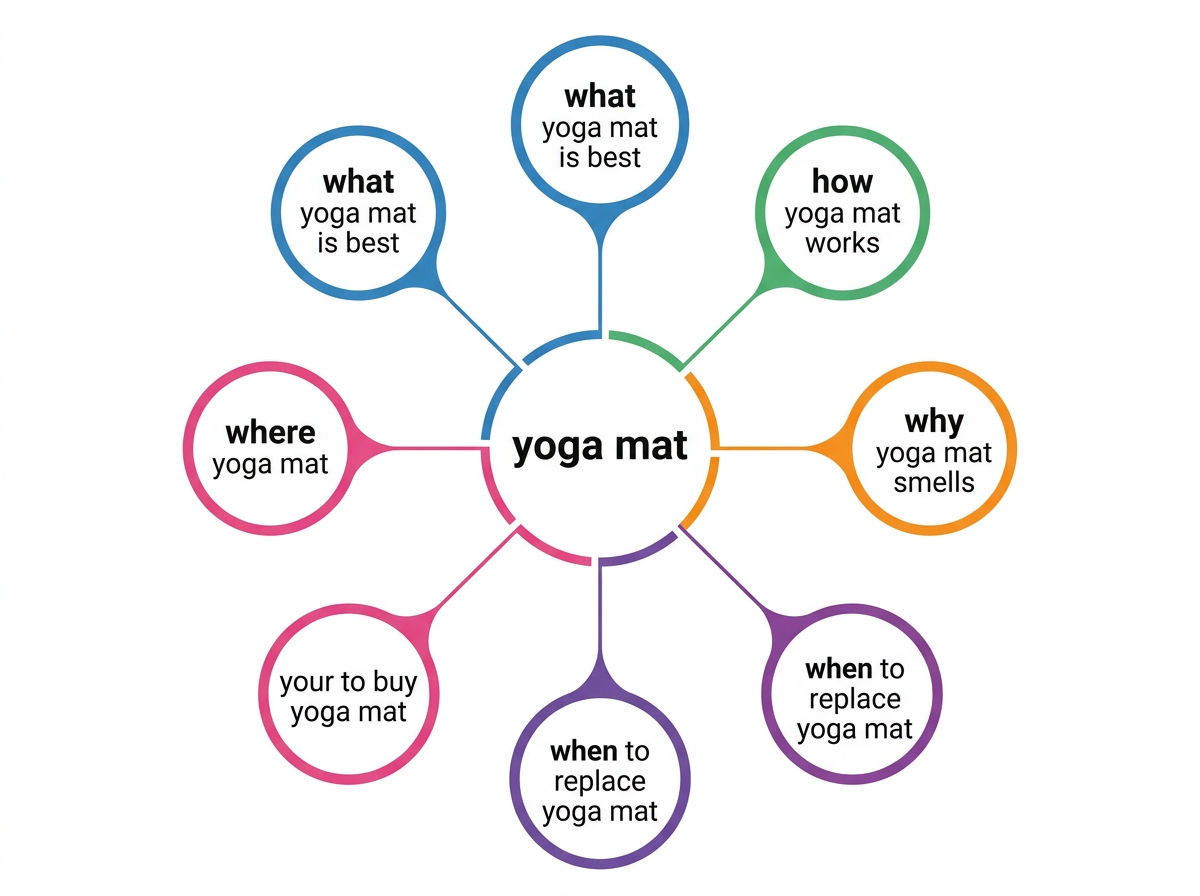
Pro tip: Type in your product category (e.g., "yoga mat") and AnswerThePublic shows you every question people ask. Turn each question into a blog post. That's your content strategy for the next 6 months.
#5. Google Search Console – Best Free SEO Tool (Period)
Price: Free Forever · Rating: ⭐⭐⭐⭐⭐ 5/5
What it does: Shows you exactly what Google sees when it crawls your store. Rankings, clicks, impressions, indexing issues — it's all there. This is the one tool every single store owner must use.
Key features:
See which keywords you already rank for
Track click-through rates for each page
Find and fix indexing errors
Submit new pages for crawling
Monitor mobile usability
Track Core Web Vitals (speed, responsiveness)
Why you can't skip this: Google Search Console is free data directly from Google. No third-party tool can match its accuracy for your own site. If you only use one SEO tool ever, make it this one.
🎯 Quick Win: Log into GSC, click "Performance," and sort by "Impressions." You'll see keywords where you show up in search results but don't get clicks. These are low-hanging fruit — improve those pages and watch traffic increase.
#6. Mangools KWFinder — $29/month · ⭐⭐⭐⭐ 4/5
Laser-focused on one thing: finding easy-to-rank keywords. The "keyword difficulty" score is more accurate than most expensive tools. Great for stores targeting niche markets.
#7. Screaming Frog — Free up to 500 URLs / $149/year · ⭐⭐⭐⭐½ 4.5/5
The best technical SEO audit tool. Crawls your entire site and finds broken links, missing meta tags, redirect chains, and duplicate content. The free version works for most small stores.
#8. Yoast SEO — Free WordPress Plugin · ⭐⭐⭐⭐ 4/5
If your store runs on WordPress + WooCommerce, Yoast is essential. Real-time on-page SEO suggestions, automatic XML sitemaps, breadcrumb navigation, and more. The free version does 90% of what you need.
#9. Google Analytics — Free · ⭐⭐⭐⭐⭐ 5/5
Track where your traffic comes from, what visitors do, and whether they buy. Essential for understanding if your SEO efforts are actually making money. Free forever, no limitations.
#10. GTMetrix — Free · ⭐⭐⭐⭐ 4/5
Tests your site speed and gives specific recommendations to make pages load faster. Critical for SEO because Google ranks fast sites higher. The free tier is plenty for monthly checks.
#11. Hemingway Editor — Free · ⭐⭐⭐⭐ 4/5
Makes your product descriptions easier to read by highlighting complex sentences and suggesting simpler alternatives. Better readability = better user experience = better SEO rankings.
#12. Canva — Free / $13/month Pro · ⭐⭐⭐⭐½ 4.5/5
Create SEO-optimized images for product pages and blog posts. Proper image optimization (file names, alt text, compression) helps you rank in Google Image Search. The free plan works great.
#13. SpyFu — $39/month · ⭐⭐⭐⭐ 4/5
See every keyword your competitors rank for and every ad they've run in the past 15+ years. Great for competitive research and finding gaps in their strategy you can exploit.
#14. Moz Local — $14/month · ⭐⭐⭐½ 3.5/5
Manages your local business listings across Google, Yelp, Facebook, and 50+ directories. Only useful if you have a physical storefront or serve local customers.
#15. SurferSEO Lite — $29/month · ⭐⭐⭐⭐ 4/5
Analyzes top-ranking pages and tells you exactly how to optimize your content: which keywords to use, how many times, what headings to include, ideal word count. Like having an SEO copywriter built into your editor.
How to Choose the Right Affordable SEO Tool for Your Store

Follow this decision tree to find your perfect SEO tool match
Not sure which tool(s) to pick? Use this framework based on your store size, experience level, and budget:
🎯 If You're Just Starting (0–100 products, $0–2k/month revenue)
Recommended stack:
GrowPins ($12/mo) for store + SEO automation, OR
Ubersuggest ($12/mo) + free tools (GSC, GA, AnswerThePublic)
Total cost: $12–29/month
Why this works: You need speed and simplicity. GrowPins does everything in one place. If you already have a store, add Ubersuggest for keyword research and you're set.
🎯 If You Have an Existing Store on Shopify/Wix (100+ products, $2k–10k/month)
Recommended stack:
Ubersuggest ($12/mo) for keyword research
Screaming Frog (free) for technical audits
Google Search Console + Analytics (free) for tracking
Total cost: $12/month + your existing platform fee
Why this works: You don't need to switch platforms mid-success. Add lightweight SEO tools that complement what you already have.
🎯 If You're Serious About Content Marketing (blog + products)
Recommended stack:
SurferSEO ($29/mo) for content optimization
AnswerThePublic (free) for topic ideas
Hemingway Editor (free) for readability
Total cost: $29/month
Why this works: Content marketing requires consistent, optimized publishing. These tools help you write better, faster, and rank higher.
🎯 If You're on a $0 Budget (Bootstrapping Phase)
Recommended stack:
Google Search Console (free) – essential foundation
Google Analytics (free) – track everything
AnswerThePublic (free) – content ideas
Yoast SEO (free, if on WordPress) – on-page optimization
Screaming Frog (free up to 500 URLs) – technical checks
Total cost: $0/month
Why this works: You can absolutely do effective SEO with free tools for the first 6–12 months. Once you hit $1,000/month revenue, invest $29–50 in paid tools to accelerate growth.
🎯 If You Want to Replace Multiple Tools with One Platform
Recommended:
GrowPins ($12/mo) – replaces store platform + SEO apps + content tools
OR SE Ranking ($39/mo) – replaces keyword research + rank tracking + audits
Total cost: $12–39/month
Why this works: Subscription fatigue is real. One login, one bill, one dashboard to learn. Much easier to manage as a solo founder.
💰 The 2–5% Rule for SEO Tool Budgets
A healthy SEO tool budget should be 2–5% of your monthly revenue:
$1,000/month revenue = $20–50/month on tools
$5,000/month revenue = $100–250/month on tools
$10,000/month revenue = $200–500/month on tools
If you're spending more than 5%, you're over-investing in tools and under-investing in inventory, ads, or other growth areas. If you're spending less than 2%, you're probably missing opportunities to automate and scale.
5 Ways to Maximize Affordable SEO Tools (Get Pro Results on a Budget)
Having the right tools is step one. Using them strategically is how you actually win. Here are five proven tactics to get enterprise-level results with budget tools:
1. Stack Free Tools Instead of One Expensive Tool
Why pay $99/month for Ahrefs when you can combine Google Search Console (free) + Ubersuggest ($12/mo) + AnswerThePublic (free) for 90% of the same functionality?
Example Stack:
Google Search Console → See what you currently rank for
Ubersuggest → Research new keywords and spy on competitors
AnswerThePublic → Find content ideas based on customer questions
Screaming Frog → Monthly technical audits
Total cost: $12/month vs. $99/month for Ahrefs alone
The trick is knowing which tool does what best and using each for its strength, rather than trying to find one tool that does everything perfectly.
2. Use Browser Extensions for Quick Checks
You don't always need to log into a full dashboard. Browser extensions give you instant SEO insights while browsing:
MozBar (free) – See domain authority and page authority for any site
Keywords Everywhere ($10/100k credits) – See search volume directly in Google
SEO Minion (free) – Check meta tags, broken links, and more with one click
Ubersuggest Chrome Extension (free with account) – Keyword data in search results
Use case: When researching competitors, install MozBar. Visit their site, and instantly see their domain authority, number of backlinks, and page metrics — without leaving the page.
3. Focus on One Tool Per Function (Avoid Duplication)
Don't pay for the same feature twice. Many tools overlap in functionality:
Function | Pick ONE Tool | Skip These (Overlapping) |
|---|---|---|
Keyword Research | Ubersuggest ($12/mo) | Don't also pay for KWFinder, SEMrush, Ahrefs |
Rank Tracking | SE Ranking ($39/mo) OR Google Search Console (free) | Pick one, not both + SERPWatcher |
Site Audits | Screaming Frog (free/cheap) | Skip audit features in SEMrush, Ahrefs |
Analytics | Google Analytics (free) | Most platform analytics are redundant |
Money-saving rule: Before subscribing to a new tool, list out its features. Cross-check with tools you already have. If there's 70%+ overlap, you don't need it.
4. Take Advantage of Annual Discounts (Save 30–40%)
Almost every SEO tool offers a discount for annual billing. If you're serious about using a tool, pay yearly:
Tool | Monthly Billing | Annual Billing | Savings |
|---|---|---|---|
GrowPins Startup | $12/mo ($144/year) | $10.20/mo ($122.40/year) | Save $21.60 |
Ubersuggest | $12/mo ($144/year) | $9/mo ($108/year) | Save $36 |
SurferSEO | $29/mo ($348/year) | $19/mo ($228/year) | Save $120 |
Pro tip: Many tools also offer discounts during Black Friday / Cyber Monday (November) and New Year (January). If you can wait, save 40–50% on annual plans.
5. Use AI to Fill the Gaps (Free or Cheap)
Modern AI tools like ChatGPT, Claude, and Perplexity can handle tasks you'd normally pay $50–100/month for:
Content outlines: "Create a blog post outline about [topic] targeting [keyword]" (replaces $89/mo content planning tools)
Product descriptions: "Write 5 variations of a product description for [product]" (replaces copywriting services)
Meta tags: "Generate SEO title and meta description for a page about [topic]"
Keyword clustering: Paste a keyword list and ask AI to group them by topic
Competitor analysis: Ask AI to summarize a competitor's content strategy based on their blog titles
Or use GrowPins ($12/mo) which has AI built directly into the platform for automated SEO tasks — no prompt engineering required.
💡 The AI + Tool Combo: Use AnswerThePublic (free) to find customer questions, ChatGPT (free) to outline the content, SurferSEO ($29/mo) to optimize it, and GrowPins ($12/mo) to publish it with proper SEO. Total cost: about $41/month for a full content workflow that would normally cost $200+.
Common Mistakes Using Budget SEO Tools (And How to Avoid Them)
Even with the right tools, most small store owners make these mistakes that waste money and limit results:
❌ Mistake #1: Using Free Tools Forever Without Upgrading
The problem: You start with Google Search Console and AnswerThePublic (both free), see some results, but never invest in paid tools. You're missing crucial data that free tools don't provide — like accurate keyword difficulty scores and competitor keyword lists.
The fix: Use free tools for your first 3–6 months or until you hit $1,000/month in revenue. Then invest $12–29/month in one paid tool (Ubersuggest or GrowPins). The ROI will be 10x+ if you use it correctly.
Rule of thumb: If you're making money from your store, invest 2–5% of revenue back into SEO tools.
❌ Mistake #2: Buying Tools You Don't Know How to Use
The problem: You sign up for SE Ranking because it looks powerful, but you have no idea what "SERP tracking" or "backlink profiles" actually mean. The tool sits unused while you keep paying $39/month.
The fix: Before subscribing, watch 2–3 YouTube tutorials on the tool. If you can't understand the basics in 30 minutes, it's too advanced for your current level. Start simpler.
Better option for beginners: GrowPins or Ubersuggest — both have clean, intuitive interfaces with minimal learning curve.
❌ Mistake #3: Focusing on Vanity Metrics Instead of Revenue
The problem: You obsess over "domain authority" or "keyword rankings" but don't track whether SEO is actually making you money. High rankings mean nothing if they don't convert to sales.
The fix: Track one metric that matters: Organic traffic to product pages → sales. Set up Google Analytics goals to measure conversions from organic search. If SEO traffic isn't converting, your keyword targeting is wrong (you're ranking for browsers, not buyers).
Key question to ask monthly: "Did I make more money than I spent on tools?" If no, adjust your strategy.
❌ Mistake #4: Not Combining Tools Strategically
The problem: You use Ubersuggest for keyword research but never implement the keywords. Or you run Screaming Frog audits but don't fix the issues it finds. Tools are useless if they don't connect to action.
The fix: Create a workflow where each tool feeds into the next:
AnswerThePublic → Find customer questions
Ubersuggest → Check search volume and difficulty
SurferSEO → Optimize the content
Google Search Console → Track rankings after publishing
Google Analytics → Measure traffic and conversions
This is a closed loop system. Each tool has a purpose in the workflow.
❌ Mistake #5: Forgetting to Track ROI on Your Tools
The problem: You've been paying for tools for 6 months but never calculated whether they're worth it. "It's only $29/month" adds up to $348/year — is that tool generating at least $348 in extra revenue?
The fix: Every quarter, review your subscriptions:
Did this tool help me rank higher?
Did higher rankings lead to more traffic?
Did more traffic lead to more sales?
If you can't answer "yes" to all three, cancel the tool or change how you're using it.
ROI Benchmark: A good SEO tool should generate 5–10x its cost in additional revenue within 3–6 months. If GrowPins costs $12/month, you should see at least $60–120/month in extra sales from improved SEO after 3–6 months of use.
Frequently Asked Questions About Affordable SEO Tools
Are cheap SEO tools as accurate as expensive ones?
For keyword volume and basic metrics: Yes, mostly. Tools like Ubersuggest ($12/mo) pull data from the same sources as Ahrefs ($99/mo) — primarily Google's Keyword Planner and their own crawlers. For most small businesses, the accuracy difference is negligible.
Where they differ: Backlink databases. Ahrefs has 30 trillion backlinks indexed vs. Ubersuggest's 6 trillion. If you're doing deep competitor backlink analysis or working in obscure niches, you'll notice the gap. For typical e-commerce SEO (keyword research, rank tracking, basic audits), budget tools are 90%+ as accurate.
Bottom line: Unless you're an enterprise with 10,000+ pages or an SEO agency serving clients, you won't miss the extra accuracy expensive tools provide.
Can I do SEO with only free tools?
Yes, for the first 3–6 months. Here's your free stack:
Google Search Console → Track rankings and find issues
Google Analytics → Measure traffic and conversions
AnswerThePublic → Content ideas (3 searches/day)
Screaming Frog → Technical audits (up to 500 URLs)
Yoast SEO → On-page optimization (if on WordPress)
This is enough to get started, optimize your existing pages, and start seeing traffic growth.
When to upgrade: Once you hit $1,000–2,000/month in revenue, invest $29–50/month in paid tools. The data you gain (competitor keywords, accurate keyword difficulty, automated tracking) will accelerate growth significantly.
Think of it like this: Free tools get you from 0 to $2k/month. Paid tools get you from $2k to $10k+ much faster.
What's the #1 SEO tool every online store needs?
Google Search Console. No debate. It's free and it shows you exactly what Google sees when crawling your store.
You get:
Real rankings for your actual pages
Click-through rates from search results
Indexing errors and how to fix them
Mobile usability issues
Core Web Vitals scores
No third-party tool can match GSC's accuracy for your own site. It's first-party data directly from Google. If you only ever use one SEO tool, this is it.
Second most important: Google Analytics (also free). Without analytics, you can't tell if SEO is actually making you money.
How much should I budget for SEO tools?
The 2–5% Rule: Spend 2–5% of your monthly revenue on SEO tools.
Monthly Revenue | SEO Tool Budget | Recommended Stack |
|---|---|---|
$0–$1,000 | $0–20/month | Free tools only (GSC, GA, AnswerThePublic) |
$1,000–$5,000 | $20–250/month | Ubersuggest ($12) or GrowPins ($12) |
$5,000–$10,000 | $100–500/month | GrowPins ($12) + SE Ranking ($39) + SurferSEO ($29) |
$10,000+ | $200–500/month | Consider Ahrefs ($99) or full SE Ranking ($89) |
Don't overspend early. Many founders waste $200+/month on tools when their store only makes $2,000/month. That's 10% of revenue on software — way too high. Invest in inventory and ads first, tools second.
Is GrowPins really better than Shopify for SEO?
For built-in SEO features: Yes. GrowPins has SEO automation built into the core platform. You don't need to install apps or hire developers — product pages are automatically optimized with:
AI-generated meta titles and descriptions
Schema markup for rich snippets
Optimized URL structures
Mobile-responsive templates (Core Web Vitals optimized)
Automatic image alt text
Shopify requires paid apps to get similar functionality:
SEO apps: $20–50/month
Content optimization: $30–80/month
Schema markup apps: $10–30/month
So you're paying $39/month for Shopify + $50–100/month for SEO apps = $89–139/month total vs. GrowPins at $12/month with the store and on-page SEO included.
Where Shopify wins: Ecosystem and integrations. Shopify has 8,000+ apps, payment gateways in 100+ countries, and enterprise-level features. If you need complex workflows, Shopify is stronger.
The verdict: For pure SEO value, GrowPins wins. For overall e-commerce power, Shopify wins. Pick based on your priority.
Which affordable SEO tool is best for complete beginners?
GrowPins (if you need a store) or Ubersuggest (if you just need SEO research).
Why GrowPins for beginners:
AI does the SEO work for you — no manual optimization needed
Clean, simple interface (not overwhelming)
Combines store + SEO so you don't juggle multiple tools
Clear tutorials and onboarding
Why Ubersuggest for beginners:
One of the simplest SEO dashboards on the market
Created by Neil Patel (trusted educator)
Doesn't bombard you with advanced metrics
Cheap enough to experiment without risk
Avoid as a beginner: Ahrefs, SEMrush, and Moz. They're powerful but have steep learning curves. You'll pay $99–129/month and use 20% of the features.
Can I switch SEO tools later without losing data?
Yes! Most SEO tools let you export data (keyword lists, rankings, audit reports) as CSV or Excel files. You won't lose your historical data when switching.
Pro tip: Before canceling any tool, export:
Your keyword list with current rankings
Competitor analysis data
Site audit reports
Backlink profiles
Store these in Google Drive or Dropbox. Even if you switch tools, you'll have baseline data to compare against.
The smart strategy: Start cheap (Ubersuggest at $12/mo), grow your store, then upgrade to more powerful tools (Ahrefs, SEMrush) once you're making $10k+/month and need deeper data. There's no penalty for starting small and scaling up.
Do I need all 15 tools mentioned in this article?
No! Absolutely not. You need 2–3 tools maximum. More than that and you're wasting money and confusing yourself.
Beginner stack (pick ONE of these combos):
Option A: GrowPins ($12/mo) + Google Search Console (free) = Done. This covers 90% of what small stores need.
Option B: Ubersuggest ($12/mo) + Google Search Console (free) + Google Analytics (free) = Total cost $12/month.
Advanced stack (for $5k+/month stores): GrowPins or Ubersuggest + SE Ranking (rank tracking) + SurferSEO (content optimization) = $50–80/month total.
The rule: Use the minimum tools that cover these core functions:
Keyword research (find what to target)
On-page optimization (implement SEO correctly)
Tracking (measure results)
Anything beyond that is optional until you're doing $10k+/month and have time to use advanced features.
Conclusion: Start with One Tool, Scale as You Grow
Your SEO tool journey: Start free, upgrade strategically as revenue grows
Here's the truth that most "SEO gurus" won't tell you: You don't need expensive enterprise tools to build a successful online store.
The small businesses winning at SEO in 2026 aren't the ones spending $300+/month on tools. They're the ones who:
✅ Start with free tools (Google Search Console, Analytics, AnswerThePublic)
✅ Add ONE paid tool when they hit $1,000/month revenue (Ubersuggest or GrowPins)
✅ Use AI strategically to fill gaps without adding subscriptions
✅ Track ROI monthly and cut tools that don't generate 5–10x their cost
✅ Focus on implementation rather than collecting more data
🎯 Key Takeaways from This Guide:
You can build a profitable store with free tools (at least for the first 6 months)
Budget tools deliver 80–90% of the results expensive tools do for small stores
The best tool is the one you'll actually use — simple beats powerful if you're overwhelmed
GrowPins ($12/mo) or Ubersuggest ($12/mo) are the smartest first investments for most stores
Your budget should be 2–5% of revenue — don't overspend on tools when your store is small
Remember: SEO tools don't make you money. Using them correctly does. A $12/month Ubersuggest subscription that you check daily and implement consistently will beat a $300/month tool stack that sits unused.
Start small. Stay focused. Scale intentionally.
Ready to Stop Overpaying for SEO Tools?
🚀 Best Value: Start GrowPins Free
Get automated SEO + storefront builder + AI content generation for less than the cost of one Starbucks coffee per week.
✅ No credit card required
✅ Set up your first SEO-optimized store in 60 minutes
✅ Free setup help for your first products
✅ Cancel anytime, no questions asked
📚 Or Explore Our Free SEO Resources:
Still not sure which tool is right for you? Contact our team and we'll help you build a custom SEO stack based on your store size, budget, and goals — completely free, no sales pitch.
About GrowPins
GrowPins.ai is an AI-powered platform that combines SEO optimization with storefront creation, built specifically for small businesses, dropshippers, and solo entrepreneurs. It helps small online stores grow without paying for expensive tools.
Learn more about our mission →
Found this helpful? Share it:
Related Articles You Might Like:
Share this post
Have a question about this post? Contact the author