Product Description SEO: The Complete Guide for 2026
Write product descriptions that rank. This complete SEO guide covers keyword placement, schema markup, length, formatting, and the mistakes that quietly kill yo
Published: May 24, 2026 · 📖 10 min read · By Dokun Bamigboye
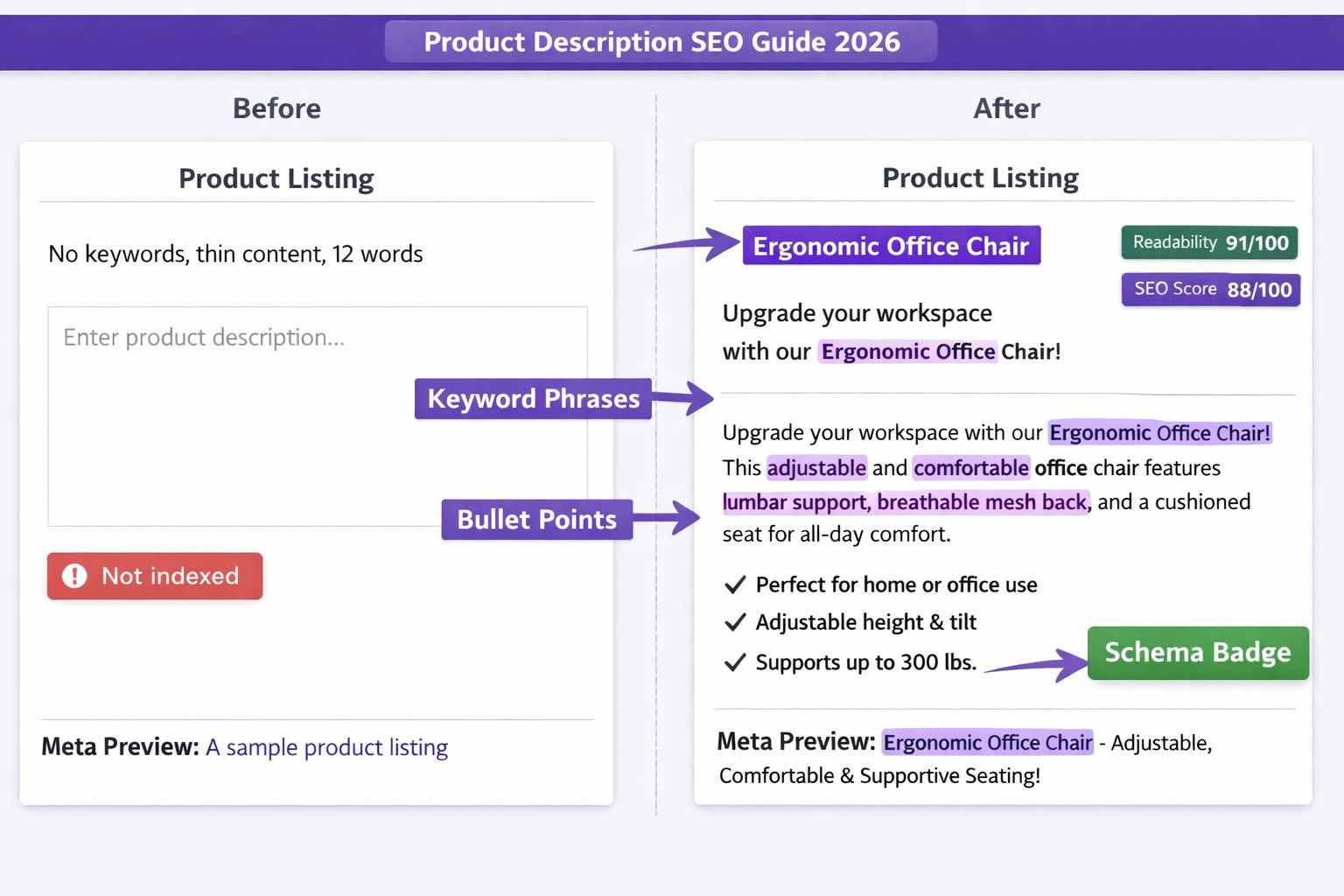
Product descriptions rank when they use the primary keyword in the first 80 words, run 150–400 words depending on product complexity, include structured bullet points, and carry Product schema markup. The most common reason products don't appear on Google is thin or duplicate descriptions copied from suppliers, which Google deprioritises across all stores using the same text.
📋 Quick Navigation
Most online sellers treat product descriptions as something to do later, a few lines copied from the supplier, a short paragraph written in a rush, or they leave it blank. Then they wonder why their products don't appear in Google search results.
Product descriptions are one of the highest-leverage places to apply SEO on an e-commerce store. Every product page is a potential Google entry point. When done right, a well-optimised description ranks for the exact search terms your buyers type before they're ready to purchase.
This guide covers exactly how to write product descriptions that rank, length, keyword placement, structure, schema markup, and the mistakes that quietly prevent your pages from appearing in search results.
If you haven't set up your store yet, start with our guide on getting your products online in under 20 minutes, then come back here to optimise each listing.
📈 Why Product Descriptions Matter for SEO
Google ranks individual pages, not whole websites. That means each product page on your store is competing independently in search results. A product page with a thin or missing description gives Google almost nothing to understand, categorise, or rank, so it simply doesn't get seen.
The three things Google is looking for on a product page
Relevance: Does this page match what people are searching for? Your product description is the primary signal. If someone searches "handmade beeswax candle eucalyptus scent" and your description doesn't contain those words in a natural context, your page won't appear for that search.
Substance: Is there enough content to evaluate? Google actively discourages "thin content" or "no content" pages with fewer than 300 words that don't provide useful information. Product pages with just one-sentence descriptions are frequently not indexed or ranked very low.
Structure: Is the page organised in a way Google can parse? Heading hierarchy, schema markup, and clean HTML formatting all help Google extract the right information from a product page.
Product descriptions vs product pages: what Google actually reads
Your product page title (H1), meta title, meta description, image alt text, and body copy all contribute to how Google ranks the page. The description is the body copy, typically the largest block of text on the page, that gives meaning to the customers. It carries the most keyword weight and does the most work to establish what the product is, what problem it solves, and who it is for.
A product page without a description is a page with almost no indexing text. It will rank for almost nothing beyond the exact product name. An optimized description gets the click, but pairing your copy with high-quality smartphone product photography is what seals the deal for mobile shoppers.
📏 How Long Should a Product Description Be?
The direct answer: 150 to 400 words for most products, with 300 being a safe minimum for Google to treat the page as substantive content.
That said, length should follow the product, not a target word count:
Simple, everyday items (phone case, cotton socks, phone stand): 150 - 250 words are sufficient. Buyers don't need a long explanation; they need confirmation that the product is exactly what they searched for.
Mid-complexity products (skincare, kitchen equipment, clothing with sizing): 250 - 400 words. Include ingredients, dimensions, sizing notes, or use cases that help a buyer make a decision.
High-consideration or high-ticket items (furniture, electronics, B2B equipment): 400 - 800 words. Buyers researching expensive purchases need more detail before they reach out or click through to buy.
Digital products (templates, courses, ebooks): 300 - 500 words. Explain what is included, what format the buyer receives, what problem it solves, and who it's designed for.
What happens when descriptions are too short
Google's quality guidelines classify pages with very little content as "low quality." For product pages, this typically means:
The page ranks only for exact-match searches on the product name (very limited reach)
The page may not rank at all if many similar products exist with richer descriptions
Google may crawl but not index the page, meaning it doesn't appear in search results at all
What happens when descriptions are too long
Artificially padded descriptions, filler sentences added to hit a word count, don't help and can hurt engagement. Google measures time on-page and bounce rate. If buyers arrive, see three paragraphs of repetitive text, and leave immediately, that's a negative engagement signal. Write to inform, not to fill space.
🔑 Keyword Placement: Where and How Often
Keyword placement in product descriptions follows a simple rule: use the primary keyword naturally in the first 50 - 100 words, then support it with related terms throughout. Here's how to apply that in practice.
Primary keyword: first paragraph
The primary keyword for a product page is typically the product type plus one or two modifiers. Examples:
"handmade beeswax candle" (product type + material)
"leather laptop bag 15 inch" (product type + material + size)
"digital marketing ebook for beginners" (product type + topic + audience)
Use this phrase in the opening sentence or within the first 80 words. Google gives more weight to keywords that appear early in the content; the algorithm interprets early placement as a strong signal of topical relevance.
Example opening: "This handmade beeswax candle is poured in small batches using 100% natural beeswax and a cotton wick. No synthetic fragrances, no paraffin, just a clean, slow burn that lasts up to 60 hours."
Secondary keywords: throughout the body
Secondary keywords are related phrases your buyers might also search. For the beeswax candle example:
"natural candle" - mention the material, burning properties
"long burn candle" - include burn time in the description
"soy free candle" - if applicable, mention what the candle doesn't contain
"candle gift" - mention gift packaging or occasions if relevant
Don't force secondary keywords. If they fit naturally when describing the product's features or use cases, include them. If they require awkward phrasing, leave them out.
Keyword density: how often is enough?
For a 300-word description, using the primary keyword phrase 2-3 times is appropriate. More than that risks keyword stuffing, which Google actively penalises. The goal is for a reader to recognise immediately what the product is and not to count how many times the keyword appears.
What not to do
Do not start the description with the product name repeated three times
Do not list keywords in a comma-separated string ("beeswax candle, natural candle, soy-free candle, handmade candle...")
Do not copy keywords from a supplier and paste them without rewriting. Google recognises duplicate content across sites and ranks it lower
🗂️ Structure and Formatting That Ranks
The way a product description is formatted affects both how buyers read it and how Google parses it. Walls of unbroken text rank worse and convert worse than structured content.
Recommended structure for a product description
Opening paragraph (2–3 sentences) - what the product is, who it is for, and the primary keyword. Write for a buyer who found your page from a search and needs immediate confirmation that they are in the right place.
Key features (bullet list) - 4 to 6 bullets covering the specifications, materials, dimensions, or specific benefits. Bullets are easier to scan than paragraphs and give Google clear, structured data points to index.
Use case or benefit paragraph (2 to 3 sentences) - what problem does this product solve, or what situation is it used in? This is where secondary keywords appear most naturally, and it is the content that often tips a buyer from browsing to buying.
Practical details (if applicable) - sizing guides, care instructions, compatibility notes, delivery format for digital products, or anything that preempts a buyer's question.
Heading hierarchy on a product page
The product name should be your H1 - there should only be one H1 per page. If your description includes subheadings (useful for longer descriptions), use H2 or H3. Common subheadings on product pages:
"What's included" - for kits, bundles, or digital products
"How to use" - for skincare, food, or equipment
"Materials & dimensions" - for physical goods
"Who this is for" - for digital products, courses, or service packages
Image alt text: the overlooked ranking factor
Every product image needs an alt text attribute. Google can't read images - it reads the alt text to understand what an image shows. For product images, the alt text should describe what's in the image and include the product name:
❌ "image1.jpg" - tells Google nothing
❌ "product" - tells Google almost nothing
✓ "Handmade beeswax pillar candle in natural cream colour, 250g" - descriptive, includes primary keyword naturally
🏷️ Schema Markup: The Hidden SEO Layer
Schema markup (also called structured data or JSON-LD) is code that tells Google exactly what type of page it's looking at and what specific data it contains. For product pages, Product schema communicates:
The product name
The price and currency
Availability (in stock / out of stock)
Product images
Brand or seller name
Review data (if reviews are present)
Why schema markup matters for rankings
Pages with valid Product schema are eligible for rich results in Google search listings that show the price and stock status directly below the page title, before a buyer even clicks. Rich results generate higher click-through rates than standard blue-link listings. More clicks at the same position mean Google progressively improves the page's ranking.
Schema markup also helps Google correctly categorise your product. Without it, Google has to infer the product type, price, and availability from the page text - which it may do incorrectly or incompletely.
How to implement Product schema
If you're on a platform that doesn't add schema automatically, you need to add a JSON-LD block to each product page's HTML. A basic Product schema looks like this:
{
  "@context": "https://schema.org",
  "@type": "Product",
  "name": "Handmade Beeswax Pillar Candle",
  "description": "Natural beeswax candle, 60-hour burn time, no synthetic fragrances.",
  "image": "https://yourstore.com/images/beeswax-candle.jpg",
  "offers": {
    "@type": "Offer",
    "price": "24.99",
    "priceCurrency": "GBP",
    "availability": "https://schema.org/InStock"
  }
}
For stores with hundreds of products, adding this manually to each page is not practical, which is why platforms that inject schema automatically have a significant SEO advantage. If you're also evaluating which SEO tools to pair with your store, see our roundup of the best affordable SEO tools for online stores
Review schema: the trust signal that also ranks
If your products have reviews, adding Review schema (or AggregateRating schema) enables star ratings to appear in Google search results. A visible trust signal that consistently improves click-through rates. This requires both the review data on your page and the schema markup to present it to Google correctly.
⚠️ Common Mistakes That Kill Rankings
1. Copied supplier descriptions
This is the most common and most damaging mistake in e-commerce SEO. When you copy a product description from a supplier or manufacturer, you are using the same text that every other retailer selling that product is also using. Google identifies this as duplicate content - and typically ranks none of the duplicate pages well, or ranks only the source (usually the manufacturer's website). If your products still aren't appearing in search after fixing descriptions, see our guide on why products don't show up on Google for a full diagnostic.
Every product description must be unique. Rewrite in your own words, add specific details relevant to your audience, and use language that reflects how your buyers actually search.
2. Missing meta title and meta description
The meta title is the clickable headline in Google search results. The meta description is the two-line summary below it. If you don't set these, Google auto-generates them from your page content and often chooses a random excerpt that doesn't represent the product well.
A well-written meta title includes the primary keyword and fits within 60 characters. A meta description that includes the keyword phrase and a clear benefit fits within 155 characters. Both should be written for every product,n ot just for the homepage.
3. No keywords in the product name (H1)
The product name on your listing becomes the H1 of the page. "Blue Mug" as a product name gives Google almost nothing to rank for. "Handmade Ceramic Blue Mug 350ml, Dishwasher Safe" gives Google a category (ceramic mug), a modifier (handmade), a specification (350ml), and a feature (dishwasher safe), all potential ranking opportunities.
Be specific in your product naming. Specificity is what long-tail keyword ranking is built on.
4. Images without alt text
Every image without alt text is a missed ranking opportunity and an accessibility failure. On a product page with 5 images and no alt text, Google receives 5 image-shaped blanks instead of 5 data points about the product. Write meaningful alt text for every image.
5. No internal links from the product page
Internal links: links from one page on your site to another, distribute authority throughout your site and help Google discover and rank related pages. Product pages that link to related products, relevant blog posts, or category pages help Google understand your site's structure and keep buyers on your site longer.
A product page with zero internal links is an orphaned page in Google's crawl map; it receives less crawl attention and builds no internal authority.
6. Ignoring mobile formatting
Google uses mobile-first indexing. It ranks pages based on how they appear on a mobile device. A product description that looks fine on desktop but displays as a single unbroken paragraph on mobile will have worse engagement metrics from mobile users. Bullets, short paragraphs, and subheadings all improve mobile readability and directly affect your search rankings.
⚙️ How GrowPins Handles Product SEO Automatically
Writing optimised product descriptions, setting meta tags, adding schema markup, and creating supporting blog content for every product is a significant time investment, especially for sellers with large catalogues. GrowPins automates all of this at the point of listing.
AI-generated product descriptions
When you add a product on GrowPins, the AI reads your product name, category, and any details you've entered and generates a complete product description. The description is keyword-informed, appropriately structured, and written to match buyer search intent. You can edit it, but most sellers publish it as-is because it's ready to rank.
AI-generated meta title and meta description
Every product listing on GrowPins gets a unique meta title (under 60 characters) and meta description (under 160 characters) written automatically. Both are optimised for the product's primary keyword. No copying, no templates, no manual editing required.
Automatic Product schema markup
GrowPins injects Product schema (JSON-LD) on every listing automatically, including the product name, price, currency, availability, and image. No coding required. Every product is immediately eligible for Google's rich results from the moment it goes live.
AI-generated product blog post: published automatically
Every product you upload gets a full AI-written blog post published to your store. The post describes the product, explains its benefits and use cases, and links back to the product listing. This creates a second indexed page on Google for each product, a blog entry that targets related search queries and drives traffic back to the listing over time.
For a store with 50 products, this means 50 product pages and 50 blog posts. All indexed, all internally linked, all working to build visibility for those products.
Storefront SEO Health monitoring
The Storefront SEO Health dashboard in GrowPins monitors your entire catalogue continuously. It flags specific issues like products with missing meta descriptions, short descriptions, and no images, with a direct action to fix each one. It functions as a live SEO audit that runs in the background, surfacing gaps before they cost you rankings.
Social content generated per product
When you upload a product, GrowPins also generates ready-to-post social media content for Facebook, Instagram, LinkedIn, X (Twitter), and TikTok,d each tailored to that platform's format and word count. The product description and social content are generated together, so your messaging is consistent across channels.
For sellers on GrowPins' AI SEO engine, the full product content stack, including description, meta tags, schema, blog post, and social posts, is handled automatically for every listing. It replaces a set of tasks that would otherwise require a copywriter, an SEO specialist, and a social media manager.
❓ Frequently Asked Questions
Does the product description affect Google Ads performance as well as organic rankings?
Not directly. Google Ads (PPC) rankings are determined by your bid, Quality Score, and landing page relevance. However, a well-written product description improves your landing page quality score (which reduces cost-per-click) and improves the conversion rate of visitors who arrive from ads. So while the description doesn't directly affect which ad position you get, it affects how much you pay for it and how many ad visitors convert to buyers.
How often should I update product descriptions?
Update a product description when the product changes (new materials, updated sizing, new features), the description is outperforming competitors, and you want to add more detail, or your keyword research reveals new terms you aren't currently ranking for. Routine updates for no reason don't improve rankings. Meaningful updates that add substance or correct outdated information can improve them.
Should I use the same description for very similar products (e.g. the same candle in different colours)?
No. If you have 10 product variants listed as separate pages, each needs a distinct description. Identical descriptions across variants are duplicate content. Google will typically rank only one of the pages and ignore the rest. Differentiate by colour, scent, size, or use case in each description. Even small differences like "This deep navy version is particularly popular for home offices and reading rooms" give Google enough variation to index and rank each variant separately.
Is AI-generated product content penalised by Google?
Google's guidelines target AI content that is spammy, low-quality, or generated at scale with no editorial oversight, not AI content that is accurate, useful, and reviewed before publishing. AI-assisted descriptions that are factually correct, specific to the product, and provide genuine value to buyers are treated like any other well-written content. The question Google asks is whether the content is helpful, not whether a human or an AI wrote the first draft.
✍️ Your Product Descriptions Are Your SEO Foundation
Every product page you publish is a potential ranking in Google. The difference between a page that ranks on page one and a page that never appears is often not the product. It's the description. Keyword placement, sufficient length, proper structure, schema markup, and unique content are the fundamentals that separate stores that get organic traffic from stores that pay for every visitor.
If writing and optimising descriptions for every product sounds like a full-time job, GrowPins automates the entire process, from the description and meta tags to the schema markup and supporting blog post, for every product you list.
Related reading: Why your products don't show up on Google · Best affordable SEO tools for online stores · Get your products online in under 20 minutes
Share this post
Have a question about this post? Contact the author